tech support 24

  • Subscribe to our RSS feed.
  • Twitter
  • StumbleUpon
  • Reddit
  • Facebook
  • Digg

Monday, 29 April 2013

StudyBlue announces annual teacher appreciation program “Thank a Teacher a Latte.”

Posted on 08:00 by Unknown


Mobile and social study platform, StudyBlue today announced the launch of its annual teacher appreciation program “Thank a Teacher a Latte.” As the largest digital library of peer-sourced study materials, StudyBlue is inviting students, parents and industry leaders nationwide to join in building a virtual Wall of Thanks to give back to the educators who have made a difference in their lives.

The 2013 Thank a Teacher a Latte program is open to everyone, including students, former students and parents. In addition, any teacher or school staff member may be recognized. With one click, a digital thank-you card is created and displayed as a keepsake. Once submitted, the esteemed educator will receive a digital “badge of honor” they can display with pride on Pinterest and other social media outlets. 300 lucky teachers will receive $5 coffee cards at the end of May when the contest subsides.

2012’s campaign saw thousands of submissions from cities and school districts across the country. Praise came from parents, students and a CEO or two “Educators are busy, and often don’t hear a simple “Thanks. With this platform we wanted to help students easily extend their gratitude to a teacher who is making, or has made, a difference in their educational goals,” said CEO Becky Splitt.

For more information on the program, to see all current Thank You Cards in real-time, visit http:/thankateacher.studyblue.com/ and www.studyblue.com.


Related:

StudyBlue - create and share flashcards, quizzes, and study guides


Read More
Posted in teacher appreciation | No comments

Friday, 26 April 2013

Quick and easy way to add memory to your Chromebook

Posted on 10:06 by Unknown


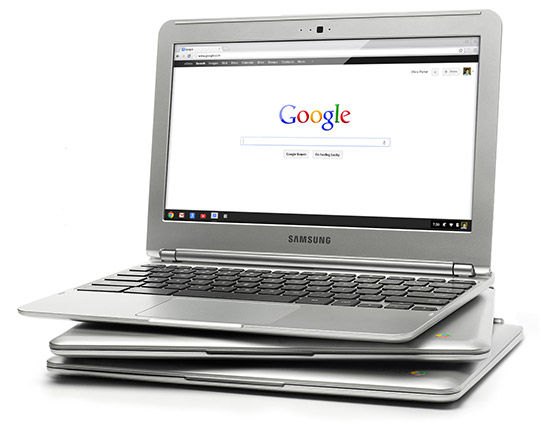
I've been using a Chromebook since getting a CR-48 from Google a few years ago, and I love it. I am currently using a Samsung Chromebook, and our district is deploying over 5000 of them.

The Chromebooks, and Chrome OS in general, are fast and work great, but every once in a while they can bog down when doing serious multitasking. Many only have 2GB of RAM and do not offer the ability to add more RAM physically. I found out about a great way to increase your memory by using zRam which uses swap space on your hard disk/SSD. Kevin C. Tofel shared this great resource that is very easy to do.

Here are the simple steps:

  1. Open up a terminal tab with the CTRL + ALT + T keys.
  2. Type “swap enable” (without the quotes).
  3. Restart your Chromebook.
It's that easy. I did it and my Chromebook runs much smoother and faster and rarely bogs down, even with 15+ tabs open. 

Disabling it is easy too. Do all of the steps but type "disable" instead of "enable".

Give it a try and see how it improves your Chromebook's performance. 


Related:

Chromebooks in Education: http://educationaltechnologyguy.blogspot.com/2012/05/new-chromebook-chromebox-and-updated.html


Read More
Posted in chromebooks, google | No comments

Google Keep, Google's Note Taking App, get's some improvements and new features.

Posted on 09:47 by Unknown


Google’s Keep, Google's easy to use note taking app, has some new features, improved features and bug fixes. Here is the list of new features from the Google Play Store.

• Create notes, lists, and audio notes
• Add photos to any note
• Hide and show checkboxes to turn notes into checkable lists
• View and create notes from homescreen and lockscreen widgets (lockscreen widgets require Android 4.2+)
• Selectable color for notes
• Safely sync notes to Google Drive and other devices
• Notes can also be used from http://drive.google.com/keep


I use Evernote for most things, but also use Keep for quick notes on the go, along with voice notes, and then I can share the notes to other apps, or just access them as needed.


Read More
Posted in Evernote, google, keep, notetaking | No comments
Newer Posts Older Posts Home
Subscribe to: Posts (Atom)

Popular Posts

  • Google+ - what is it and how to get started using it
    Google+ is Google's social network and it has become my preferred social network. Facebook has gotten too political, although I do use...
  • Google makes some big announcements this week!
    Google's I/O conference is this week and they have made some big announcements. Here's a summary and some places you can find more ...
  • Wolfram launches iOS app for Geography
    Wolfram Alpha, the computational search engine has a new iOS app. Wolfram Geography Course Assistant App allows you to compare socioeconomi...
  • Reuse, update and recycle old technology
    Technology changes rapidly and it seems like something you just bought last week is already outdated and replaced by something new. Some peo...
  • World Backup Day - make sure your data and files are backed up!
    Tomorrow is  World Backup Day! Everyone needs to have their files backed up. It is very easy to have your flash drive, hard drive, or comput...
  • Evernote Trunk for School - apps and resources that work with Evernote for School
    I love Evernote . I use it for everything. Lesson plans, lesson schedules, notes, web clippings, lesson resources, travel notes and much mor...
  • kanban2go - free visual task management and organization
    KanBan2Go is a free productivity and organizing app I learned about from Richard Byrne at Free Technology for Teachers . kanban2go is a vi...
  • MyPhysicsLab - Free Physics Simulations
    MyPhysicsLab is a free site that contains, you guessed it, physics lab simulations. They are simple and created in Java, but illustrate the...
  • Evernote - My Adventure Using it With My Students Continues
    Evernote is one of my favorite tools and resources. I use it for lesson plans, research, collecting resources, clipping things from the web...
  • My Experience as a Paramedic on 9-11-01
    I am a paramedic and I was an Aerospace Engineer before I became a teacher. On this 11th anniversary of that horrible day, I would like to s...

Categories

  • 21st century resources
  • 21st century skills
  • 9-11-01
  • administration
  • adobe
  • Adobe Acrobat Reader
  • adobe creative cloud
  • Adobe Digital School Collection
  • Adobe Education Exchange
  • Adobe photoshop
  • adobe touch
  • anatomy
  • Android
  • angry birds
  • animals
  • animation
  • animoto
  • ap physics
  • Apple
  • apps
  • apps for education
  • art
  • assessment
  • astronomy
  • authentic
  • automate
  • aviary
  • aviary falcon
  • awards
  • back to school
  • backchannel
  • behavior
  • binder clips
  • biology
  • blogger
  • blogs
  • bloom's taxonomy
  • bookmark
  • box.net
  • business applications in education
  • CAD
  • calendar
  • cell animation
  • cellphones in school
  • celly
  • charts
  • chemistry
  • chrome browser
  • chromebooks
  • CIO
  • citelighter
  • class dojo
  • classroom management
  • classroom resource
  • clearly
  • Cloud Computing
  • cloud file storage
  • cloud storage
  • cms
  • collaboration
  • college resources
  • college textbooks
  • community
  • computer science
  • computer tips
  • computer training
  • conference
  • contest
  • corporate support
  • course management
  • CPEP
  • CPR
  • create free PDF files
  • create website
  • crocodoc
  • daily technology
  • demonstrations
  • DEN
  • denny awards
  • digital citizenship
  • digital literacy
  • digital textbooks
  • Discovery Education
  • Discovery Educator Network
  • disease
  • DNA/Genetics
  • document camera
  • documents
  • Donors Choose
  • doodle 4 google
  • drawing
  • dropbox
  • e portfolios
  • e-textbooks
  • earth day
  • earth science
  • edcamp
  • edmodo
  • edreform
  • edtech
  • edublogs
  • education
  • educational
  • educational games
  • educational leadership
  • educational reform
  • educational technology
  • educator resources
  • educlipper
  • Edudemic
  • edutecher
  • effective teacher
  • embed files
  • emergency preparedness
  • employment
  • ems
  • end of the year
  • engineering
  • english
  • engrade
  • environmental
  • eportfolios
  • Evernote
  • evernote schools
  • evernote trunk
  • evernote. cloud computing
  • facebook
  • fax
  • feedly
  • field trips
  • file backup
  • file conversion
  • file share
  • file sharing
  • file sync
  • financial
  • financial literacy
  • firearms safety
  • flash cards
  • foreign language
  • forensics
  • forums
  • free alternatives
  • free conference
  • free e-textbooks
  • free magazine
  • free online courses
  • free resources
  • free resources for students
  • free software
  • free technology
  • free technology for teachers
  • funding
  • gafe
  • GCT
  • genetics
  • geography
  • get organized
  • gmail
  • google
  • google applications
  • Google Chrome
  • google Chrome OS
  • Google Docs
  • Google docs in the classroom
  • google doodle
  • google drive
  • google education
  • google for
  • Google for Educators
  • google groups
  • google maps
  • Google Play
  • google plus
  • google sites
  • google teacher Academy
  • google+
  • grade book
  • grants
  • graphics editing
  • graphing calculator
  • great ideas
  • GTA
  • guest post
  • guest speaker
  • gun safety
  • handwriting
  • health
  • Heart
  • History
  • hurricane sandy
  • ideals
  • igoogle
  • image editing
  • infographics
  • insurance
  • interactive whiteboard
  • internet safety
  • internet search
  • internet use
  • internship
  • iOS
  • iPad
  • iste
  • IWB
  • job search
  • keep
  • labs
  • learning management system
  • lesson plans
  • lesson resources
  • libreoffice
  • lifehacker
  • literature
  • livebinders
  • livescribe
  • lms
  • make school relevant
  • markup
  • martial arts
  • math
  • media sources
  • mentoring
  • merge PDF files
  • Microsoft
  • Microsoft Office
  • Microsoft Office alternatives
  • mimio
  • mindmapping
  • mobile learning
  • money
  • most popular posts
  • multimedia projector
  • multimedia projects
  • mythbusters
  • NASA
  • national geographic
  • nature
  • new teacher advice
  • news
  • nexus 7
  • notes
  • notetaking
  • online calculator
  • online conference
  • online course
  • online meeting
  • Online Tech Tips
  • online textbook
  • organization
  • outlook
  • paperless
  • PBL
  • pbs
  • pdf
  • pedagogy
  • personal learning network
  • photo editing
  • photos
  • photoshop
  • physics
  • pinterest
  • plagiarism
  • planner
  • PLN
  • polling
  • PowerPoint
  • prepare for college
  • presentation
  • Prezi
  • printer
  • product review
  • productivity
  • professional development
  • programming
  • project based learning
  • puzzle
  • QuickOffice
  • quizzes
  • reading
  • reference
  • reflection
  • remote control
  • research
  • Richard Byrne
  • rockets
  • rss feed
  • save money
  • scholarships
  • school cio
  • science
  • science fair
  • science resources
  • science simulations
  • science videos
  • scientific calculator
  • screen capture
  • screen recording
  • search
  • signature
  • sikorsky
  • skitch
  • sliderocket
  • slideshow
  • smart phone
  • smartpen
  • smartphone
  • smartphone experts
  • social bookmarking
  • social media
  • social network
  • Social Studies
  • software tutorials
  • space education web sites
  • sports safety
  • spreadsheet
  • springpad
  • STEM
  • student information system
  • study aids
  • sugarsync
  • tablet
  • task manager
  • teach paperless
  • teacher appreciation
  • teachers
  • Tech and Learning Magazine
  • tech support
  • tech tips
  • tech training videos
  • techbook
  • techforum
  • techlearning
  • technology
  • technology help
  • text messaging
  • tips and resources
  • to do list
  • tours
  • training
  • twitter
  • unconference
  • unit conversion
  • video
  • video conferencing
  • video conversion
  • video editing
  • videos
  • virtual
  • virtual conference
  • virtual science
  • virus
  • water safety
  • web 2.0
  • Web Applications
  • web based image editing
  • web browser
  • web clipping
  • web search
  • website
  • whiteboard
  • Windows OS
  • wolfram
  • Wolfram Alpha
  • worksheets
  • worth ave group
  • writing
  • YouTube
  • zoho

Blog Archive

  • ▼  2013 (37)
    • ►  November (5)
    • ►  October (3)
    • ►  September (1)
    • ►  August (2)
    • ►  July (1)
    • ►  June (3)
    • ►  May (6)
    • ▼  April (3)
      • StudyBlue announces annual teacher appreciation pr...
      • Quick and easy way to add memory to your Chromebook
      • Google Keep, Google's Note Taking App, get's some ...
    • ►  March (1)
    • ►  February (7)
    • ►  January (5)
  • ►  2012 (463)
    • ►  December (12)
    • ►  November (10)
    • ►  October (36)
    • ►  September (57)
    • ►  August (25)
    • ►  July (13)
    • ►  June (64)
    • ►  May (122)
    • ►  April (119)
    • ►  March (5)
Powered by Blogger.

About Me

Unknown
View my complete profile